( I follow everyone back who follows me. ♥ )

Mt. Timbak - Scaling the third-highest Peak in Luzon

Scaling Mount Timbak was really such a great experience! Meeting with new folks, be inspired by the locals, sharing insights and laughing over silly jokes with the Conqueror Outdoor Club it was indeed a meaningful and fun experience that I will treasure forever.

Cagbalete Island Experience - Php 1,200 Cheapest Budget Ever!

Glad our CAGBALETE ISLAND Trip was a success. Thanks to Ms. Tess of Villa Cleofas who answered all of my inquiries and to Josiah Sicad of Lakas Trip. I'm glad that I stumbled upon his blog for this made our journey possible in the cheapest way.

Calaguas Island - Beach Bum's Paradise

What I love in Calaguas Island is its shimmering grains of powder-white sand and its awesome turquoise waters. No doubt, these make me want to go back again!

Dare to Climb a Mountain?

We face a lot of challenges everyday of our lives. Some are easy to handle while some may seem too much for us to take. And as I gradually became fond of climbing lately I realized that Life is.. Life is also a mountain to climb!

From Religiosity to Relationship

I was very sincere in seeking God. But I also saw the reality that my religiosity in church did not carry over to my life at home. I got angry at my nieces and pinched them whenever they touched my things, gave my mom, my ate, a weeks/ or month of silent treatment in rebellion to their strictness, spent hours devouring novels and giving way to my imaginations. I was selfish and self-centered.

Showing posts with label Online Marketing. Show all posts

Wednesday, January 30, 2013

Adding Top Social Media Sharing Buttons to your blog posts


Wish to add a social Media Sharing Buttons in a snap? Here's my latest updates!

Compare with my previous posts,
I think this one, is a lot easier and updated, since 'PIN' button has been added too! So if you want to add social media sharing buttons like Google +1, Twitter, Facebook like+send, Pinterest to your blogger posts ALL at once, here are the steps to follow:
  1. Once sign-in to gmail, go to Google dashboard.
  2. Look for the blogger section and on the left side of it, click manage blogs
  3. Select the blog you wish to modify. Look for the dropdown menu at the left side, then select Template and then Click Edit HTML.

  4. NOTE:  Make sure to back-up first your Template before proceeding with the next steps.

  5. In the window that appears, Tick the box that says, "Expand Widget Templates". 
  6. In the HTML code, find <data:post.body/>  (Note: This line of code appears twice. Make sure to choose the first one.)
  7. Copy all the code from the box and paste above the code: <data:post.body/>
  8. Click the "Save Template" button and then just click the "Close" button.


Kindly hit like if it helps you. :)


Monday, September 24, 2012

Upload Youtube Video to iPhone

Here's how to upload video from YouTube to your iPhone.

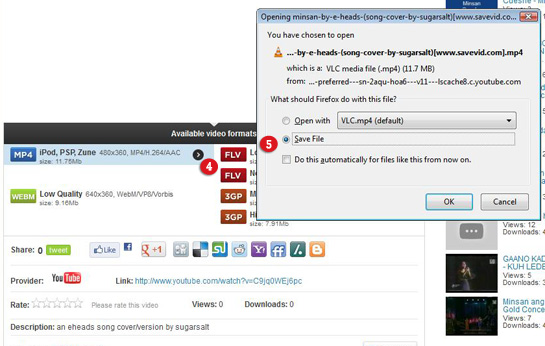
1. First, copy the URL of the video you wish to save. Go to http://www.savevid.com/ and paste the URL.
2. Click Download button.

Savevid is a free online tool which gives user the ability to download videos from streaming Video sites like Youtube, etc.

3. There are 6 formats that are available for download. Select a format/ or file that suits for your need. 

4. For iPhone, click the small arrow right beside the MP4 format. A dialog box will appear asking you to save/ or open the file.

5. Save File. You can now watch the video on your computer without being connected to the Internet.

Sunday, March 11, 2012

Third-Party widget can slow down your Site


Cbox are just one of those many free third-party chat widget that you can add on your website. Adding this widget, you can have the chance to do real time interactions with your visitors - which  I love most! Unfortunately, when I added this widget, my blog site started loading too slow.

I noticed that third-party widgets can slow my web pages down the most. Its true. When I browsing my site, my page loads first then takes a few seconds to load the Facebook fan button, google+ button, adsense, live-chat widget etc. So I as much as I wanted to retain the latter, I have no choice but to remove it.


Here are other reasons why your site may be unresponsive or too slow:
  • Usage of heavy images and videos everywhere. Use lighter images and sorter videos if possible. Images directly from your digital camera can be too big. Take time to re-size before you upload it on your site. 
  • Usage of JavaScript and Flash too much. It is best to avoid flashy images as it will slow down your site. 
  • Usage of third party widgets that may connect to other sites to load.  Keep third-party applications to a minimum. I all want my web site to be filled with interactive widgets and sidebars filled with cool content, but I realized that some apps that pulls from the database can be a potential threat. Verify the necessity of each widget and remove the unnecessary ones.
Note to self: Unless they are absolutely necessary, don’t install them
  • Heavy theme. Use a theme that are more of HTML, CSS.  Avoid using of images for background. Noticed that I've only use color for my background. (Press CTRL + U, to inspect code)
  • Slow server. Choose the right hosting provider for you. If you are not into shared hosting, you can use VPS and Dedicated servers instead, price is quite hefty though.
Google includes website loading speed as an important metric in their ranking algorithm. If you want your blog to rank high in the search results, you need to make sure your blog loads faster than others.


Saturday, March 10, 2012

Connect Page to Twitter?

Wants to Connect your Fan Page to Twitter?

1. Logged in to Facebook and proceed to: https://www.facebook.com/twitter/
2. Click > Link a Page to Twitter. An option to Link it to your profile will also be prompt.


2. Select the page where you want to link you're twitter.


3. Authorize Facebook to use your account and and voilà! Any updates you post on your page will be also posted on twitter!


4.  Undo, edit the settings anytime you want.

keep wandering,

Jek /hihi

Sunday, February 05, 2012

All-in-one Share Buttons on your Blog Post

Last year I created a post about how to "Add Facebook Like Button on Blogspot". This time I'm gonna share you on how to add all-in-one share buttons on each of your blog post for easy content sharing!

With the code below you can easily integrate the important social share buttons like twitter, google +, facebook like, or even share it with your facebook friends!

You can add share buttons before or after your post, as easily as a snap! Here's how:


  1. Go to your Blogger Dashboard.
  2. Then on Layout/Design Tab > Page Elements.
  3. Click on "Add a Gadget" link, choose HTML/Javascript from the list, and paste ALL the code below, on it. Save.
  4. Position your html gadget - display it at the top or at the bottom of your blog post, then Save!
 Copy all this code.


If the feature of adding a gadget is not available on your layout/design tab,
Go to Design Tab > Edit HTML, and paste the code above, before or after this code:


(CTRL + F, too easily find this code in the html file.

Save and you're done! :)


>> Kindly "LIKE" this post if it helped you : )

Monday, January 30, 2012

IE9 to begin Automatic Updating Across Vista, W7, and XP

Microsoft Automatic Updates to IE9 appears to be that most people don't seem to be aware of. For Microsoft doesn't market the updates extensively. Microsoft will start to update itself automatically to the latest version starting in January.

The initial automatic updates is said to begin in January 2012 for customers in Australia & Brazil who have turned on automatic updating via Windows update. They will see the auto-updating first if the feature is turned on in Windows Update. It also said that Automatic Updates will start in Korea on February.

A rollout schedule in the US and some territories is unknown at this point, but Microsoft's Ryan Gavin said in a company blog that, like the release of IE9 earlier this year, Microsoft will take a measured approach, scaling up over time. Microsoft's first priority is to get customers using older versions of Internet Explorer forcibly updated to the latest stable build. This is also to make the web safer for personal and commercial usage: 
“We want to make updating to the best protection possible as fast and simple as we can for Windows customers. IE is how millions of Windows customers connect to the Web, so keeping that part of Windows updated at all times is critical to keeping them safe online. With automatic updates enabled through Windows Update, customers can receive IE9 and future versions of Internet Explorer seamlessly without any “update fatigue” issues. ” 
However, Businesses and individuals that don't want the upgrade, will still have the control. Microsoft provides automatic update blocker kits for IE8 and IE9. The Blocker Toolkit helps ensure that IE9 is introduced to PCs at the right time. Microsoft says customers who have declined previous installations of IE8 or IE9 through Windows Update will not be automatically updated.

Thursday, January 19, 2012

My Short Take on SOPA & PIPA Bill

I was supposed to finished my research task today but it seems that I will not be able to do that since most of the websites where I can get  the information I need are blacked out. And yes, including Wordpress.org.


This is in line with the protest against proposed US anti-piracy law.  The proposed legislation is to Stop Online Piracy Act aka (SOPA) in the U.S. House of Representatives, and the PROTECT IP Act aka (PIPA) in the U.S. Senate.

I believe that we don’t have to be a U.S. citizen to take charge here. As an everyday internet user we also have to speaks out about this internet censorship. With that I do also signed the online petition.

Here's my short take on this proposed bill:

SOPA & PIPA Bill is intended to protect against online piracy by granting broad new powers to the U.S. Government when it comes to blocking access to sites that deliver pirated content. Yep it all sounds good. But if this bill gets passed Social Media sharing will also be limited as users might not be able to upload and share images, videos, clips, or any type of copyrighted content WITHOUT permission. In the long run, this bill would be a great way for Governtment and Corporation to control the information that reaches us.

Although the bills' drafters says that the laws aren’t intended to be used that way, it's just hard to think that it is NOT impossible to happen. Its just scary though that many of us only hear about important things/ news because someone shares a link or a video on facebook, twitter or some other social media sites and these stories are often shared by someone who stumbled across an article on one of the thousands of websites which could  be stand in danger of being banned, if one of these bills gets passed.

It makes me sad to think that if our ability to share and spread information is limited, chances are many of these important issues will go unnoticed by majority and spreading information about these other causes, as well as discussing and protesting them will become far more difficult.

Yes it would really be nice to stop Piracy, but please, NOT our Liberty.

Tuesday, January 03, 2012

Today's Challenge: One Week Facebook Blackout

This is the first part of a little challenge I've set myself for 2012. I've challenged myself to quit facebook for just a week. To discontinue sharing content and stories with my friends and to be no longer updated on whats happening on my news feed somehow terrifies me but I guess this is even bigger sign that I should try it.

I've realized that Facebook really takes up a good chunk of my day. The past few weeks I've wasted so much hours of good time on Facebook. Even when I'd started doing productive work, I kept shifting back to Facebook and wasting more of my time. And I'm not that strong to resist temptation on my own so to stop this overcoming Facebook addiction I had to personally blocked my access to Facebook. (Ofcourse I can bring it back but I have to deliberately unblock the site first)

The concept of doing this freak me out, its a torture for me, really! But I know it needs to happen. And I have to. First for me to accomplish more in my work in less time, second to take some time to be "still", third to prove to myself that I could still comfortably live without Facebook and lastly to overcome this kind of temptations.

Yes! Its a challenge for me. I have blocked my access already just today but will officially marked my calendar on the 6th of January that's friday 'til January 11 for a week of Facebook blackout. Wish me luck! Will keep you posted on my progress by next week!

Monday, December 26, 2011

How to Leave a Group Message in Facebook?

How to eave a Group Message in Facebook If you wish to STOP receiving messages in a conversations with multiple friends:

  1. Click on the Actions Menu, located at the top right corner of the chat window.
  2. Select "Leave Conversation."


Note: The other people will get notified as soon as you had left the conversations.

Wednesday, October 05, 2011

Block Facebook Access in Mozilla

If you wish to personally block your access on Facebook to your Firefox Mozilla, here's how:

1. Mozilla Firefox > Go to Tools > "Add-ons"

2. Click "Get Add-ons", on the upper left side.

3. Type "blocksite" in the search box. When "BlockSite" add-ons appear, Click Install. Restart Firefox when prompted. (Note: if BlockSite add-on has been added already it will no longer show up on the list.)

4. After Firefox restarts, go to "Tools" > "Add-ons" > Click "Extensions" on the upper left side. "BlockSite Add-on" must now enable.

5. Click "BlockSite" options. Check "Enable authentication," then enter your desired password This is  to keep other users from changing the settings in "BlockSite" without your permission.

6. Click the "Add" button, enter the URL of the website you would like to block ex: https://www.facebook.com/, then click "OK." Repeat to add more sites, or click the "Remove" button to delete the URL.


Thursday, September 29, 2011

See How Easily You Can Add Cute Emoticons on Blogspot

See How Easily You Can Add Cute Emoticons on BlogspotIf you read some of the posts on "Random thoughts", you will notice that I use "cutey emoticons" at times.

And to add emoticons on blogger's post, here's how:

STEP 1:   Log into your Blogger account.
STEP 2:   Once you've signed in to Blogger, you'll see your dashboard.
STEP 3:   Click "Design" (formerly "Layout").
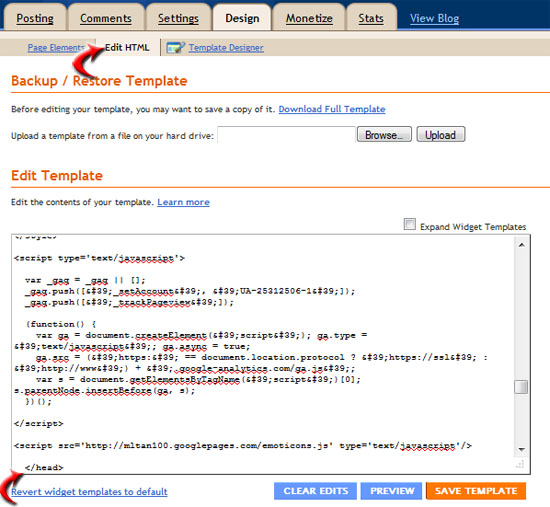
STEP 4:   Click "Edit HTML". 

Paste this code <script src="http://mltan100.googlepages.com/emoticons.js" type="text/javascript"/> just above </head> (see sample below).  

Press CTRL+F and type </head> to find it quickly.


Please take note that in order to these emoticons apply in your blog post, there should be 'no spaces in between the characters'.

: ): P
: D:-D: ) )
= ) )=)= D >

.
Isn't they're Cute??

/ wa ha ha / hi hi
/ o m g/ n o
/ dig nose/ s w e a t
/ s h o c k/ f l o o r
/ h m m/ X D
/ b l u r/ b l u s h
/ no big deal/ p l e a s e
/ b y e


Rock on! /XD

Saturday, September 10, 2011

Easiest Way to Add Facebook Like Button on Blogspot

Easiest Way to Add Facebook Like Button on Blogspot - Blogger Widgets Facebook "Like" Button will allow you're readers to quickly share you're posts with their Facebook Friends. Adding Facebook Like Button increase your Blog Traffic. How? When a friend of yours click the "Like button" on one of your posts, it will shows up on you're friend's wall page and in all of their friend’s news feeds. If you're facebook friends of friend get intrigued by your blog post which liked by your friend he might also click your post and check out your blog and like the post.  Another traffic and viral marketing at it’s finest.

If you want to incorporate  "Facebook Like Button" on your blogspot, here's how:

Step 1

  1. Login to Blogger and go to Layout/Design Tab > Page Elements.
  2. Click on Add Gadgets.
  3. Search for HTML/Javascript . Then click on it.
  4. Now paste this generated code then save.


Step 2

  1. Now go to Design
  2. Edit HTML. Click on the check, “Expand Widget Templates”. (Copy the html code on a notepad, just to  make sure you have backup.)
  3. Look for <html
(click image to get a better view)
 
> And just before the closing angle bracket ( > ), paste this code:
 xmlns:fb="https://www.facebook.com/2008/fbml" 


> Save the Template. The "Facebook Like Button" should now show up on each of your posts!

It should looks like this:


Once a friend of mine click the "Like" button on one of my blog post, the update would automatically shows up on his/her wall.


And as I've said, viral marketing at it’s finest!


Check this Out:

Tuesday, August 30, 2011

Email Celebrates 29th Birthday!

Email Celebrates 29th Birthday!
Electronic Mail, commonly called e-mail/email celebrates its 29th Birthday on August 30, 2011. Dr. V. A. Shiva Ayyadurai, the Inventor of the World's First E-Mail System said EMAIL has so far defied "experts" who had been writing it off since 2000.

Thursday, July 28, 2011

How to incorporate "Add to circles" widget to your Blogspot

Here's an easy way to create "Add to circles" widget in your Blogspot or blogger account.

  1. Go to Google Plus widget. >> Here
  2. Click the Get Widget Button.
  3.  Customize the look of your widget using the tabs.

Monday, July 25, 2011

How to Change the default Blogger Icon with your Own?

Changing the Favicon in your blog's URL is one way to customize your site. This make your blog site more personalized.  Favicon is a small icon/ or symbol located at the left of your Blogger site's Web address. The default image of the favicon is the orange Blogger B symbol. You can change the favicon of your site whenever you like. Just follow these easy steps:

  1. Create/ or select an icon of your own. It could be your very own logo. Make sure that the image is sized at 16 x 16 pixels.
  2. Now log in to your Blogger control panel, go to the layout panel of the blog you want to customize. Go to the 'Design Tab', Select ‘Edit HTML’.
  3. Look for the code: <link href=’FaviconURL’ rel=’shortcut icon’ type='image/vnd.microsoft.icon'/> This should be available on your editor. (select ‘Ctrl + F’ and search for 'favicon' to find it easily)
  4. Once you’ve found it, replace this portion href=’FaviconURL with the link that you copy from the free hosting site.  
sample: <link href='http://img827.imageshack.us/img827/5516/newfavicon.png' rel='shortcut icon' type='image/vnd.microsoft.icon'/>

Click "Save Template. Your new favicon should now appear in your URL window, at the top left corner of your browser.  

Thursday, July 14, 2011

Get all your Facebook Friends in Google+

The easy way to find and invite all your Facebook friends to G+ is to import all their contacts to Gmail. With this, the imported contacts will be shown under the “Find and Invite” section of the  G+ Circles page, the ones who already have Google+ will be listed first.

Wednesday, July 13, 2011

See how easily you can export email addresses of your Facebook Friends

The easiest way to get all the Facebook contacts is to use Yahoo Mail. I have tried some Facebook apps but they are less likely to work for me. I find this one useful especially if I need to have a complete email contacts of all my Facebook friends in one single sheet which is not easy if I'm go on with it manually. 

Here are  the 9 simple Steps: (click the image to enlarge)

  • Go to your Yahoo Mail Account.
  • Click on Contacts tab.
  • On this page there's an option to import contacts, click on it. 

  • Now you can see options to Import contacts from Facebook, Gmail, Hotmail and Others.
  • Click on Facebook and allow Facebook to access your information. 

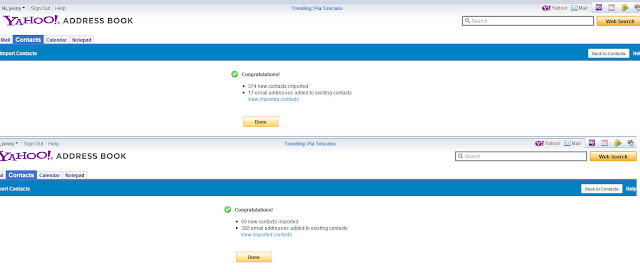
  • Once done, it will showed the total contacts that you successfully imported from Facebook. 
 
  • Go back to Contacts tab and click on Tools drop down button.
  • Select Export.
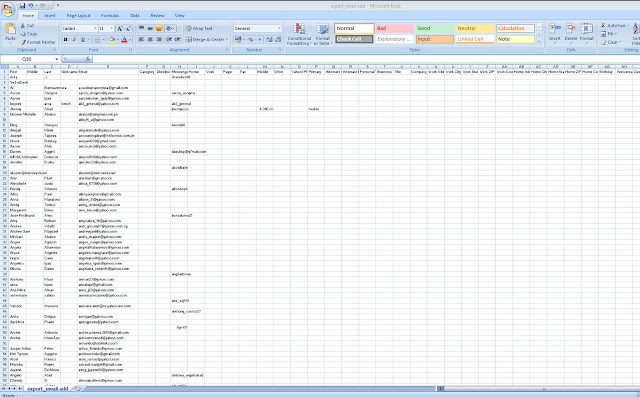
  • Choose "Yahoo! CSV:" and click the "Export Now". 

    I have now all my Facebook contacts in CSV format! yey! I just have to to tweak & sort it a bit, & voila! I'm done :). 


    By the way, you can also use this CSV format to Import contacts to Gmail. These imported contacts will be show up under the “Find and Invite” section of the G+ Circles page, and the ones who already have Google+ will be listed first. :)

Google+ Sign Up Now and Get Connected!


I've been waiting for the google+ project since I've started following the  updates on google Plus button three months ago. But it seems that Google is still keeping silent about the launch date. Infact google isn't sharing invitations to its latest project with everyone. Glad I received an invitation from my boss 2 weeks ago.

On July 7, I heard the news from a fellow blogger that Google allowed again users to invite their friends to join the Google+ but it lasted only for few hours. According to Google+ engineering director Dave Besbris they "feel comfortable enough to open up invites for a brief period."


Though Google will continue to throttle invites. This is to ensure also that bugs are fixed while there are still a relatively few people in the field trial.

However, if you want a Google+ invite and can't wait on its public release, try to login using your Gmail ID from Google+ website.  If it doesn't work shoot me your Gmail account and I'll send you Invites! :)  Cheers!
Use the 'post a comment' section at the top of this post to share your thoughts. Your comments are what makes this thing fun! I LOVE to hear from you and do my best to respond to everyone! THANK YOU!
 
google-site-verification: google1bceb82f6129bfec.html